發表文章

目前顯示的是有「BIOS」標籤的文章

Download Windows 11 ISO for installation
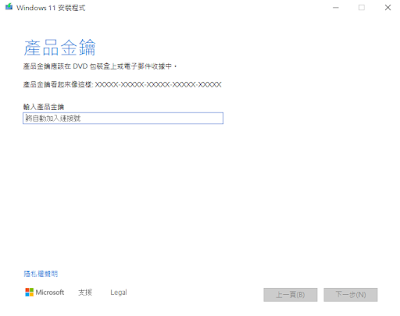
圖片
 1. Download Creation Tool from below https://www.microsoft.com/zh-tw/software-download/windows11 2. search => cmd.exe  => run as administrator cd C:\Users\AccountName\Downloads   # if your mediacreationtool.exe in  "my computer" > "download" >media 3. In  command line mode type commands as below mediacreationtool.exe /Eula Accept /Retail /MediaArch x64 /MediaLangCode zh-TW /MediaEdition Enterprise  or mediacreationtool.exe /Eula Accept /Retail /MediaArch x64 /MediaLangCode zh-TW /MediaEdition Professional 4. download software  rweverything  from http://rweverything.com/download/ 5. 亦可直接透過網頁下載 https://www.microsoft.com/zh-tw/software-download/windows11 往下方找尋如以下圖片

Intel SSD 535 480G寫入放大倍率問題,造成提早無法抓取SSD硬碟,待機時重開機

圖片
因 Intel SSD 535 有寫入放大問題,故已發現3顆有斷斷續續無法正確抓取BIOS,或是僅抓到StandForce,也直接報Intel維修,大約都是3-4年後出現該症狀 報修電話如下( https://www.intel.com.tw/content/www/tw/zh/support/contact-support/apac-contact.html ) 因原廠釋出的 intel ssd tool  ( https://downloadcenter.intel.com/download/29609/Intel-Solid-State-Drive-Toolbox?v=t ) 還是無法更新 Intel 535 480G (手冊就只說RG21為最新) 如論壇所示最新的韌體RG2V,要從 RG21 -> 更新至RG2V 故最後還是只能送原廠出保固 詳情可參考Intel 論壇 https://forums.intel.com/s/question/0D50P0000490XOxSAM/intel-535-480gb-disappears?language=en_US

Update ASUS ROG BIOS B450-I Gaming mainboard

圖片
1. Download BIOS file from ASUS Website https://www.asus.com/Motherboards/ROG-STRIX-B450-I-GAMING/HelpDesk_BIOS / 2. Store latest BIOS file in C: or USB Disk 3. Reboot and Click Del until displaying UEFI BIOS 4. Choose Tab of Tool and select ASUS EZ Flash 3 Utility 5. choose via Storage Devices(s) and click Next 6. select downloaded BIOS file from storage C:  or your usb disk tag from left path 7.Confirm your choice and click to write firmware 3. Upgrading done and reboot automatically