發表文章

目前顯示的是有「selinux」標籤的文章

samba enable FS share under SELinux on CentOS
圖片
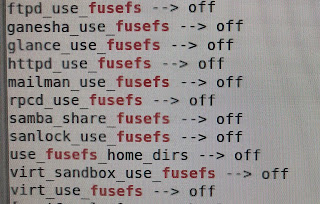
list context of files or folders for selinux mandatory protection  $ ls -lZd / 1. external USB disk $ getsebool -a | grep fusefs $ setsebool -P samba_share_fusefs on 2. nfs disk $ s etsebool -P samba_share_nfs on 3. create and enable home dirs $  getsebool -a | grep samba $ setsebool -P samba_create_home_dirs on $ setsebool -P samba_enable_home_dirs on 4. global share ACL $ setsebool -P samba_export_all_ro on $ setsebool -P samba_export_all_rw on

Resolve write error message about cache_tmp folder on website

for CentOS  1.  enable selinux to permit httpd_unified $ setsebool -P httpd_unified 1   2. go to parent folder of cache_tmp if it could not be written   $ semanage fcontext -a -t httpd_sys_rw_content_t 'cache_tmp'  $ restorecon -v 'cache_tmp'   Reference  https://access.redhat.com/documentation/en-us/red_hat_enterprise_linux/7/html/selinux_users_and_administrators_guide/sect-managing_confined_services-the_apache_http_server-booleans SElinux Alert Browser GUI

CentOS 7 設定squid來架設proxy server

1. su - 2. yum -y install squid 3. 解除 selinux 限制 setsebool squid_connect_any 1 setsebool squid_use_tproxy 1 4. 解除防火牆,當proxy server port 為3128 先知道現在在哪個zone firewall-cmd --get-active-zones firewall-cmd --zone=public --add-port=3128/tcp --permanent firewall-cmd --zone=public --add-service=squid --permanent firewall-cmd --reload 5. 編輯 /etc/squid/squid.conf 若要僅綁定一個IP,則server設為  server 10.0.0.111:3128  6. 加入開機載入並且啟動或重啟動squid systemctl enable squid systemctl start squid