發表文章

常用詐騙或惡意網址確認網站

  Google  https://transparencyreport.google.com/safe-browsing/search?url=&hl=zh-tw ScamAdvisor https://www.scamadviser.com/ W3.org https://validator.w3.org/checklink Trendmicro https://global.sitesafety.trendmicro.com/index.php Dr. link check https://www.drlinkcheck.com/ Norton safe web https://safeweb.norton.com/ URL void https://www.urlvoid.com/ Symantec Bluecoat https://sitereview.bluecoat.com/#/ VirusTotal https://www.virustotal.com/gui/home/url abuseipdb https://www.abuseipdb.com/ down for everyone or just me https://downforeveryoneorjustme.com/

取消Excel與word網際網路與網路路徑超連結自動格式

圖片
 常常會遇到在Excel與Word整理惡意網址與ip卻出現Excel與Word自動格式化這些惡意網址與超連結,而變成可以點擊的超連結,卻不小心去點擊到惡意網址或釣魚網址.可以利用以下方式消除自動(如下圖) Excel =>檔案=>選項=>校訂=>自動校正選項=>輸入時自動套用格式=>網際網路與網路路徑超連結 Word=>檔案=>選項=>校訂=>自動校正選項=>自動格式設定=>以超連結取代網際網路和網路路徑 Word=>檔案=>選項=>校訂=>自動校正選項=>輸入時自動套用格式=>以超連結取代網際網路和網路路徑

Install Windows 11 on VMware Workstation 16

圖片
 1. enable encrypt   2. Add TPM Hardware 3. save hardware setting 4. download and boot with windows 11 iso https://www.microsoft.com/zh-tw/software-download/windows11  

samba enable FS share under SELinux on CentOS

圖片
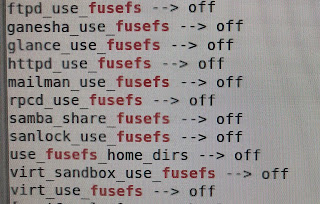
list context of files or folders for selinux mandatory protection  $ ls -lZd / 1. external USB disk $ getsebool -a | grep fusefs $ setsebool -P samba_share_fusefs on 2. nfs disk $ s etsebool -P samba_share_nfs on 3. create and enable home dirs $  getsebool -a | grep samba $ setsebool -P samba_create_home_dirs on $ setsebool -P samba_enable_home_dirs on 4. global share ACL $ setsebool -P samba_export_all_ro on $ setsebool -P samba_export_all_rw on

Installing VMware workstation pro on Ubuntu 22.X (Jammy Jellyfish)

圖片
 1. Download workstation pro for vmware website https://www.vmware.com/tw/products/workstation-pro/workstation-pro-evaluation.html e.g.  VMware-Workstation-Full-16.2.3-19376536.x86_64.bundle 2. Download modules patch from github https://github.com/mkubecek/vmware-host-modules/releases/tag/w16.2.3-k5.18 tarball https://github.com/mkubecek/vmware-host-modules/archive/refs/tags/w16.2.3-k5.18.tar.gz 3. Execute by sudo $ chmod 755 VMware-Workstation-Full-16.2.3-19376536.x86_64.bundle $ sudo apt-get -y install build-essential $ sudo VMware-Workstation-Full-16.2.3-19376536.x86_64.bundle 4.Execude by account $ vmware 5. patch vmmon and vmnet $ tar zxvf w16.2.3-k5.18.tar.gz  $ cd  vmware-host-modules-w16.2.3-k5.18 $ tar cvf vmnet.tar  vmnet-only && sudo cp vmnet.tar /usr/lib/vmware/modules/source/ $ tar cvf vmmon.tar vmmon-only && sudo cp vmmon.tar /usr/lib/vmware/modules/source/ $ sudo vmware-modconfig --console --install-all         ...

Bypassing network activation to initialize windows 11

圖片
1.  Shift + F10 keys or Fn + Shift + F10 keys to open administrator command line 2. type   oobe\BypassNRO.cmd Reboot or type taskmgr.exe  More Details -> End task " Network Connection Process " 3. choose additional options " No internet" reference https://hothardware.com/news/windows-11-setup-internet-connection-bypass

Install gnome-tweak to add minimize and maximize options of window

 refereces https://trendoceans.com/how-to-get-minimize-and-maximize-button-in-gnome/

Install phpMyAdmin rpm from rpm on CentOS

source https://rpmfind.net/linux/rpm2html/search.php?query=phpMyAdmin&submit=Search+...&system=&arch=  #keyword search: phpmyadmin http://rpm.pbone.net/index.php3   required php  php-common php-mysqlnd php-xml php-mbstring php-opcache php-pdo php-sodium php-process path /usr/share/phpMyAdmin /etc/phpMyAdmin  <------config.inc.php /etc/httpd/conf.d/   <---------phpMyAdmin.conf  for httpd

Upgrade php and httpd(apache) on CentOS 7

圖片
1. for latest php from https://rpms.remirepo.net/ $ wget https://rpms.remirepo.net/enterprise/remi-release-7.rpm $ sudo  rpm -ivh remi-release-7.rpm $ sudo yum -y --enablerepo='remi-php74' --enablerepo='remi'  install php-7.4.29       2. for latest httpd from https://repo.codeit.guru/ $ wget https://repo.codeit.guru/codeit-repo-release.el7.rpm $ sudo rpm -ivh codeit-repo-release.el7.rpm $ sudo yum -y install httpd-2.4.53 3. If error message occurred on httpd-2.4.53 + php 5.4.X (Invalid command php...) modify /etc/httpd/conf.modules.d/00-mpm.conf disable mpm_event with #(sharp) and enable mpm_prefork with unsharp references https://rpms.remirepo.net/ https://repo.codeit.guru/ https://repo.codeit.guru/packages/centos/7/x86_64/  https://repo.ius.io/ https://tw.arip-photo.org/320126-error-start-apache-php-value-MDGNGZ https://www.datadoghq.com/blog/monitoring-apache-web-server-performance/#prefork-mpm #Cyber Security    

Convert MBR format system disk to GPT format

圖片
mbr2gpt.exe 1.  start -> settings -> update & security -> recovery -> advanced startup 2. choose an option -> troubleshoot -> advanced options -> command prompts 3. X:\Windows\system32\> mbr2gpt /validate 4. X:\Windows\system32\>mb2gpt /convert 5. Reboot and press Del or F10 (or F1,F2 for Laptop) to BIOS configuration to change BIOS to EFI boot mode  On VMware:   5. Have added 100MB EFI sector between C: and Recovery partition References https://www.windowscentral.com/how-convert-mbr-disk-gpt-move-bios-uefi-windows-10 https://docs.microsoft.com/zh-tw/windows/deployment/mbr-to-gpt